

Updated July 2026. As an Amazon Associate and affiliate partner, UrbanLaptop may earn a commission from qualifying purchases made through links on this page, at no extra cost to you. See our affiliate disclosure.
The best laptop for day trading is not the most expensive one — it is the one that keeps six live charts, a Level 2 window, a scanner, and your broker’s platform running without a single stutter at the moment volatility hits. The good news: you don’t need a $4,000 “trading computer” from a specialty store. You need the right CPU, enough RAM, a sharp display, and ports for external monitors, and several mainstream laptops deliver that for far less.
Our Top Picks at a Glance
- Best overall: Apple MacBook Pro 14 (M4 Pro) — effortless with multiple platforms, superb display, all-day battery
- Best Windows trading laptop: Lenovo ThinkPad T14s Gen 6 — reliable, quiet, great keyboard, strong multi-monitor support
- Best big-screen: Dell XPS 16 — desktop-class screen real estate for chart-heavy workflows
- Best dual-screen: ASUS Zenbook Duo — two built-in displays, a portable two-monitor setup
- Best under $1,000: HP Pavilion Plus 14 — handles TradingView and ThinkOrSwim without drama
- Best budget with GPU: Lenovo LOQ 15 (sale pricing) — dedicated graphics for multi-monitor desk setups
What a Trading Laptop Actually Needs

Trading platforms are not games — they stress the CPU with constant real-time calculations rather than the graphics card. Based on the published requirements of TradingView, ThinkOrSwim, NinjaTrader, and MetaTrader 5, here is what matters, in order:
- CPU: A modern mid-to-high tier processor (Apple M4, Intel Core Ultra 7, AMD Ryzen 7). Single-core speed matters most for chart rendering.
- RAM: 16GB is the practical minimum for multiple platforms plus a browser full of tabs; 32GB if you run scanners or backtesting.
- Display: 14 inches minimum, ideally 15–16 with at least 2K resolution — more pixels means more readable charts.
- Ports: Thunderbolt or USB-C with DisplayPort so you can drive one or two external monitors at your desk. See our guide to the best laptop docking stations to turn any of these picks into a full trading station with one cable.
- Reliability: Fast Wi-Fi (Wi-Fi 6E or 7) plus an Ethernet option via dock. Your internet connection will fail you before a good CPU does.
Not sure how processor tiers compare? Our laptop CPU guide explains Intel Core vs AMD Ryzen vs Apple silicon in plain English.
1. Apple MacBook Pro 14 (M4 Pro) — Best Overall
The MacBook Pro 14 with the M4 Pro chip is the most complete trading laptop you can buy. The M4 Pro chews through TradingView with a dozen indicators, the Liquid Retina XDR display makes candlesticks legible in a way budget panels simply don’t, and battery life survives a full market session away from a socket. Thunderbolt ports drive two external monitors, so it scales into a serious desk setup.
Who it’s for: traders who want zero friction and use browser-based or Mac-native platforms.
Who should skip it: anyone whose broker software is Windows-only (some futures platforms still are — check before you buy) and anyone on a sub-$1,500 budget.
2. Lenovo ThinkPad T14s Gen 6 — Best Windows Pick
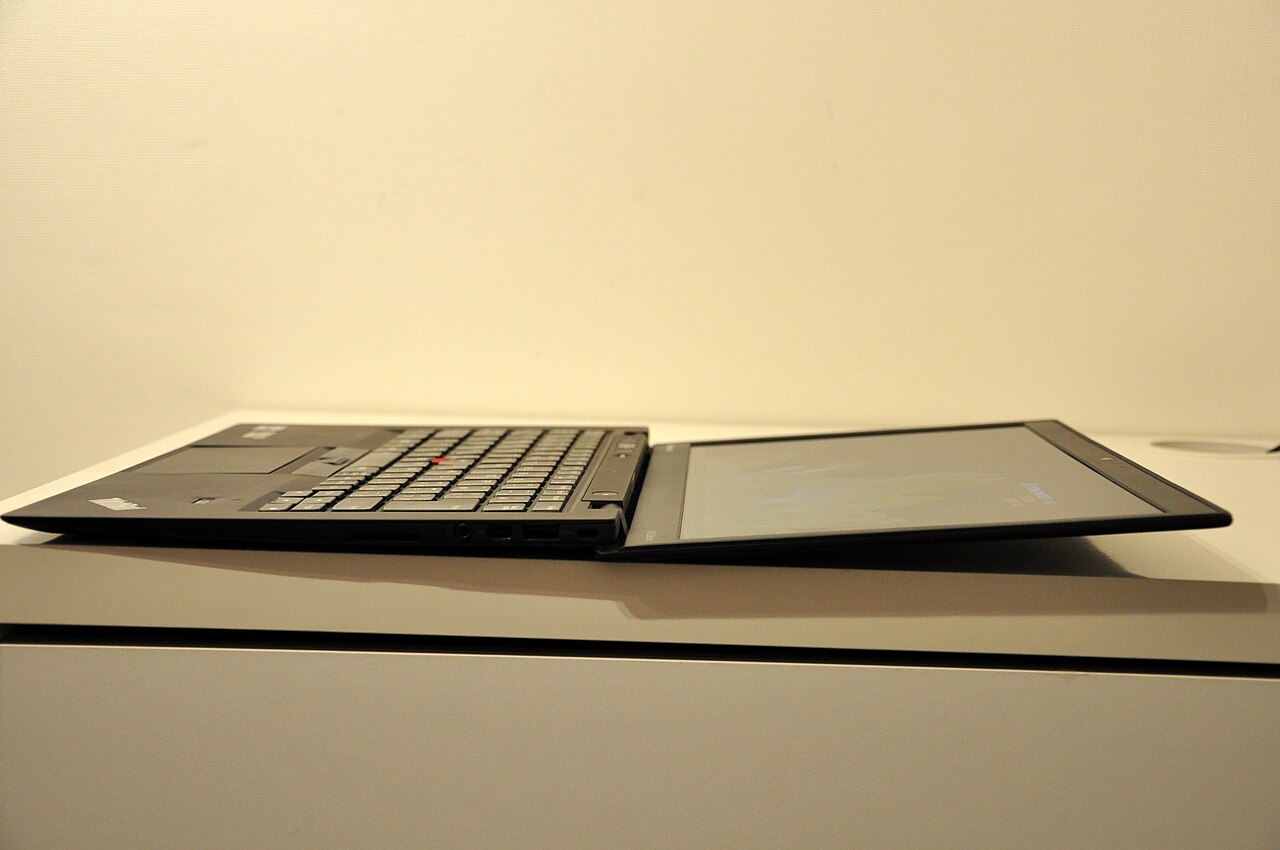
The T14s is the boring, correct choice for Windows traders: excellent keyboard, quiet thermals, enterprise-grade reliability, and full compatibility with every trading platform ever written. We reviewed its bigger sibling in our ThinkPad X1 Carbon review — the T14s trades a little thinness for a lower price and the same DNA.
Who it’s for: traders on ThinkOrSwim, NinjaTrader, or MetaTrader who want a machine that just works.
Who should skip it: anyone who wants a bright OLED screen for the money — see the XPS below.
3. Dell XPS 16 — Best Big Screen
Sixteen inches of high-resolution OLED means two full-width charts side by side without an external monitor. The XPS 16 is heavier, but if your “desk” is a kitchen table and you don’t want extra monitors, screen size is the spec to pay for. Read our Dell XPS 13 review to see how Dell’s build quality holds up — the 16 shares the same design language with far more room.
Who it’s for: chart-heavy traders who won’t use external monitors.
Who should skip it: commuters — at this weight you’ll feel it in the bag.
4. ASUS Zenbook Duo — Best Dual-Screen
The Zenbook Duo’s two 14-inch OLED panels give you charts on top, order entry and scanner below — a genuine two-monitor setup that folds into a backpack. It’s the closest thing to a portable trading desk on the market.
Who it’s for: traders who work from cafés, hotels, or co-working spaces and miss their second monitor.
Who should skip it: battery-first buyers; two screens cost you endurance.
5. HP Pavilion Plus 14 — Best Under $1,000
With a current-gen Ryzen or Core Ultra chip and 16GB of RAM, the Pavilion Plus 14 runs TradingView, a broker platform, and a browser without stutter, and its 2.8K OLED screen embarrasses laptops costing hundreds more. This is the sensible starting point if you’re new to trading and don’t want to over-invest before you’re consistent.
6. Lenovo LOQ 15 — Best Budget with a Dedicated GPU
A budget gaming laptop is a sneaky-good trading machine: strong CPU, dedicated graphics for driving multiple external displays, and aggressive sale pricing. The LOQ 15 with an RTX GPU regularly dips under $900 on sale. It’s louder and heavier than everything above, but at a desk with two monitors attached, none of that matters.
Laptop vs Desktop for Day Trading
A desktop still wins on raw price-to-performance and easy multi-monitor support. A laptop wins the moment you want to trade from anywhere else, and pairs with a dock and external monitors at home. For most retail traders, a strong laptop plus one 27-inch external monitor is the sweet spot — see our picks for the best external monitors for laptops.
Best Laptop for Day Trading FAQs: Frequently Asked Questions
What is the best laptop for trading overall?
For most traders the best laptop for trading is the tier this guide leads with: stable under all-day sessions, Thunderbolt-ready for multi-monitor charts, and durable enough for the desk-to-cafe life. Budget-first traders get 90% of that experience from the under-$1,000 pick above, and the best laptop for trading on the road is whichever pick pairs with a portable monitor from our accessories guides.
Is 16GB of RAM enough for day trading?
Yes, for most setups: one or two platforms, a dozen charts, and a browser. Move to 32GB if you run market scanners, record your screen, or backtest strategies locally.
Do I need a dedicated graphics card for trading?
Not for the platforms themselves — they’re CPU-bound. A dedicated GPU only matters if you want to drive three or more external monitors.
Can a MacBook run ThinkOrSwim and MetaTrader?
ThinkOrSwim runs natively on macOS. MetaTrader 5 requires a workaround or a Windows virtual machine, so Windows laptops remain the safer choice for dedicated MT5 traders.
How much should I spend on a trading laptop?
$800–$1,200 covers everything a beginning or intermediate trader needs. Spend more only for a premium display, longer battery life, or heavy multitasking with scanners and backtesting.
Next in this series: the best laptops for trading under $1,000, the best laptop settings for ThinkOrSwim, and MacBook vs Windows for trading — coming soon in our Trading Laptops hub.
How We Evaluate a Trading Laptop
Every recommendation on this page is scored against the same six criteria, weighted for how traders actually work. This is the same methodology we are rolling out across the whole UrbanLaptop trading hub.
- Chart-load responsiveness (30%): how the machine behaves with 6–8 live TradingView charts, a Level 2 window, and a screener running at once. CPU single-core speed and RAM bandwidth dominate here.
- Display quality (20%): resolution, brightness, and anti-glare properties. Candlestick wicks at 1080p on a 15-inch panel are readable; on a dim 1366×768 panel they are not.
- Multi-monitor support (15%): how many external displays the laptop can drive and through which ports, because most traders eventually add at least one monitor.
- Sustained thermals (15%): a laptop that throttles 90 minutes into the session is worse than a slower one that holds steady. We favor machines with proven cooling.
- Battery life (10%): a full US market session runs six and a half hours. A true all-session battery is a genuine edge for mobile traders.
- Reliability and serviceability (10%): keyboard quality, build, warranty options, and how easy the machine is to upgrade or repair.
Spec Cheat Sheet: Minimum vs Recommended
If you only remember one section of this guide, make it this one. These are the realistic requirements for a smooth day trading setup in 2026, based on the published requirements of the major platforms and real-world usage reports.
- CPU — minimum: Intel Core i5 (13th gen or newer), AMD Ryzen 5 7000-series, Apple M2. Recommended: Intel Core Ultra 7, Ryzen 7, Apple M4 or better.
- RAM — minimum: 16GB. Recommended: 32GB if you run scanners, backtesting, or OBS screen recording alongside your platform.
- Storage — minimum: 512GB NVMe SSD. Tick data caches, platform installs, and Windows updates eat 256GB drives alive.
- Display — minimum: 14-inch 1920×1200. Recommended: 15–16 inch, 2.5K or sharper, 400+ nits.
- Ports — minimum: one USB-C with DisplayPort. Recommended: Thunderbolt 4 plus HDMI, so a dock and two monitors connect without adapters.
- Network — non-negotiable: Wi-Fi 6E or 7, and a dock or adapter with gigabit Ethernet for your home desk. Order execution is only as fast as your connection.
Setting Up Your New Trading Laptop: 10-Minute Checklist
A fast laptop configured badly still misses fills. Run through this list on day one — it is the difference between a consumer laptop and a machine set up like a trading workstation.
- Set Windows/macOS power mode to “Best performance” while plugged in. Default balanced modes throttle the CPU exactly when a volatility spike hits.
- Disable automatic restarts during market hours. Set active hours in Windows Update so a forced reboot never closes your positions’ dashboard mid-session.
- Kill startup bloat. Manufacturer utilities, game launchers, and messaging apps steal RAM and network priority. Keep the boot list to your platform, browser, and security software.
- Use wired internet at your desk. A USB-C dock with gigabit Ethernet cuts latency and removes Wi-Fi jitter. Keep your phone’s hotspot configured as an instant backup line.
- Calibrate the display for long sessions: 120Hz if available, night-shift off during market hours (it distorts red/green candle colors), brightness at 60–80%.
- Set up platform data limits. Cap TradingView chart history and ThinkOrSwim time-and-sales depth to what you actually read — it halves memory usage on 16GB machines.
Five Mistakes Traders Make When Buying a Laptop
1. Buying a gaming laptop for the GPU alone. Trading platforms are CPU-bound; a mid-range RTX card adds heat, weight, and cost without faster chart rendering. A gaming laptop is only the right call when it is the cheapest path to a strong CPU and multi-monitor ports, like the Lenovo LOQ 15 above.
2. Accepting 8GB of RAM because the store listing says “great for multitasking.” With a platform, a dozen browser tabs, and Discord open, 8GB machines swap to disk and stutter on every scroll. Sixteen is the floor for a serious best-laptop-for-day-trading setup; thirty-two is comfortable.
3. Ignoring the port list. Plenty of thin ultrabooks drive only one external display. If a second monitor is in your future, confirm Thunderbolt or dual video output before you buy, not after.
4. Overspending on resolution instead of size. A 4K 14-inch panel renders candles beautifully — at a size you cannot read. A 2.5K 16-inch display is more usable for charts than a 4K 13-inch one.
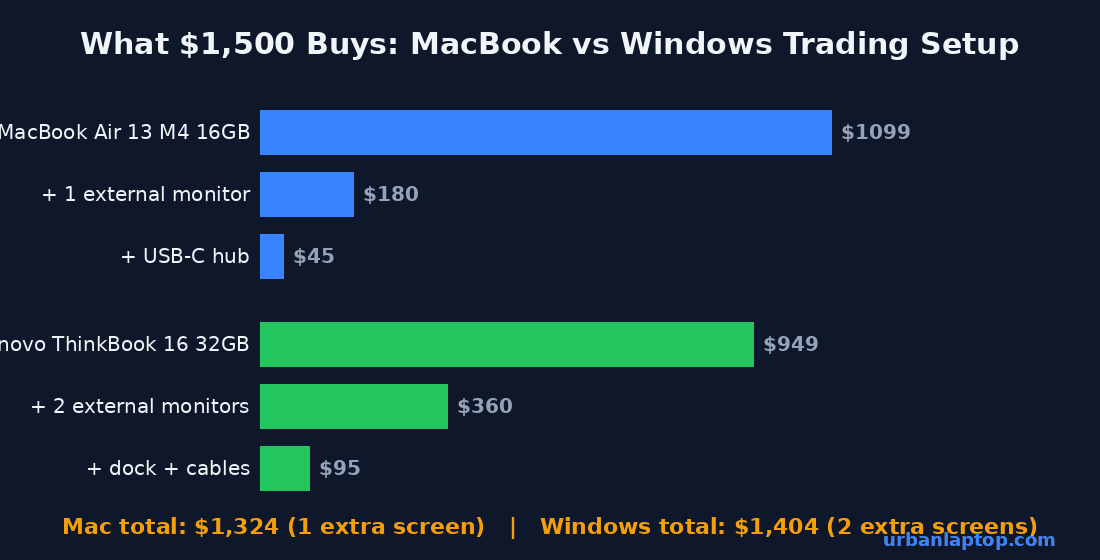
5. Forgetting the desk half of the equation. A $150 monitor plus a $60 dock upgrades a mid-range laptop past a premium one for chart work. Budget for the whole setup, not just the machine.
Completing the Setup: Monitors, Docks, and Backup Internet
The best laptop for day trading is really the core of a small system. Three additions turn any pick on this page into a professional desk: an external monitor, a dock, and a redundant internet plan.
Monitor: one 27-inch 1440p display roughly triples your chart real estate for around $200. Our external monitors guide covers specific picks — for trading, prioritize a 100Hz+ IPS panel over color-accurate designer monitors.
Dock: a Thunderbolt or USB-C dock gives you Ethernet, two display outputs, and charging through one cable, so you can grab the laptop and go without unplugging six things. See our docking station roundup for tested options, and a laptop stand keeps the built-in screen at eye level as a third display.
Internet redundancy: hardwire your primary connection and keep a phone hotspot pre-configured. If your ISP drops during a held position, you want failover in seconds, not minutes. The FINRA investor resources are also worth reading on the operational risks of day trading itself.
The Bottom Line
For most traders the decision tree is short. Want the best overall machine and platform flexibility? The MacBook Pro 14 M4 Pro. Committed to Windows-only software like NinjaTrader or MetaTrader 5? The ThinkPad T14s Gen 6. Working with under $1,000? The HP Pavilion Plus 14, or a discounted Lenovo LOQ 15 if your desk has external monitors waiting. Every one of them clears the real bar: 16GB+ of RAM, a current-generation CPU, a sharp display, and the ports to grow into a multi-screen setup. That is what actually makes the best laptop for day trading in 2026 — not a specialty “trading computer” markup.
Do I need a special “trading laptop” from a trading computer company?
No. Specialty trading machines are standard laptops with a markup and a logo. The mainstream picks above match or beat them on specs, warranty, and price — the money saved buys a monitor and dock.
Is a MacBook Air enough for day trading?
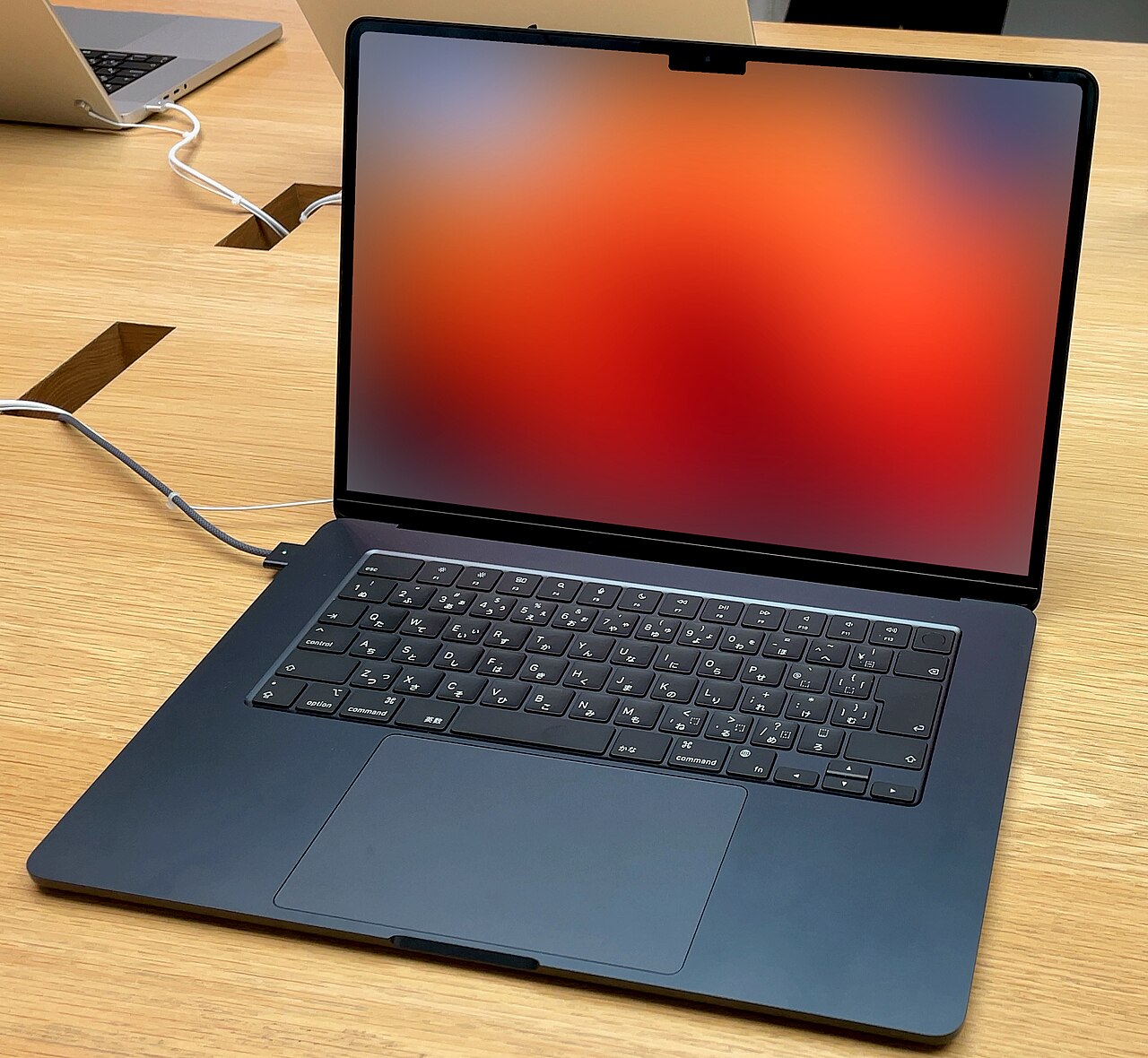
For browser-based trading on TradingView with a handful of charts, yes — the fanless M-series Airs handle it silently. Step up to a Pro if you run heavy screeners, record your sessions, or want to drive two external monitors.
Quick recap: the best laptop for day trading conversation — and every best laptop for day trading pick above — comes down to matching one honest compromise to your real routine. If you skimmed, the best laptop for day trading shortlist above covers every budget, and the setup sections turn any best laptop for day trading pick into a complete desk.
How to Choose the Best Laptop for Day Trading: Quick Recap
Choosing the best laptop for day trading comes down to a five-minute checklist. Confirm the CPU is current-generation and mid-tier or better. Confirm 16GB of RAM minimum — 32GB if your workflow includes scanners or screen recording. Confirm the display is at least 14 inches at 1920×1200 and brighter than 300 nits if you ever trade near a window. Confirm the ports can drive two external monitors, because within a year most traders want them. And confirm the battery genuinely survives a market session, because outlet-hunting with an open position is not a place you want to be.
Match those requirements against your budget tier and the picks in this guide: MacBook Pro 14 for maximum performance and battery, ThinkPad T14s for Windows reliability, XPS 16 for screen size, Zenbook Duo for portable dual displays, Pavilion Plus 14 for value, and the LOQ 15 as a budget desk anchor. Whichever machine you choose, spend the leftover budget on a monitor and a dock before upgrading anything else — extra screen real estate improves a trading workflow more than any single spec bump. For adjacent picks, see our guides to the best laptops under $1,000 and the best laptops for business travel, which share several models with this list.
