

Updated July 2026. As an Amazon Associate and affiliate partner, UrbanLaptop may earn a commission from qualifying purchases made through links on this page, at no extra cost to you. See our affiliate disclosure.
The best Chromebooks stopped being cheap laptops years ago and became something more interesting: the lowest-friction computers sold. Eight-second boots, updates that install invisibly, batteries that embarrass Windows rivals at the price, and a security model that makes malware a spectator sport. This guide ranks the best Chromebooks of 2026, draws the honest line around who ChromeOS actually serves, and flags the specs that separate the delightful ones from the landfill tier that gave the category its old reputation.
Best Chromebooks: The Picks
Best overall: Lenovo Chromebook Plus 14 — the Plus-class formula executed with the fewest compromises.
Best premium: ASUS Chromebook Plus CX54 / Spin series — bright 1200p panels, aluminum builds, all-day stamina.
Best budget: Acer Chromebook Plus 515 — the certified floor, priced like the old junk tier but built above it.
Best convertible: the Spin variants — tablet flexibility where ChromeOS’s Android apps actually earn it.
Best for students: whichever Plus-certified model is on deepest sale — the certification is the spec that matters.
The Plus Certification: Why the Category Split
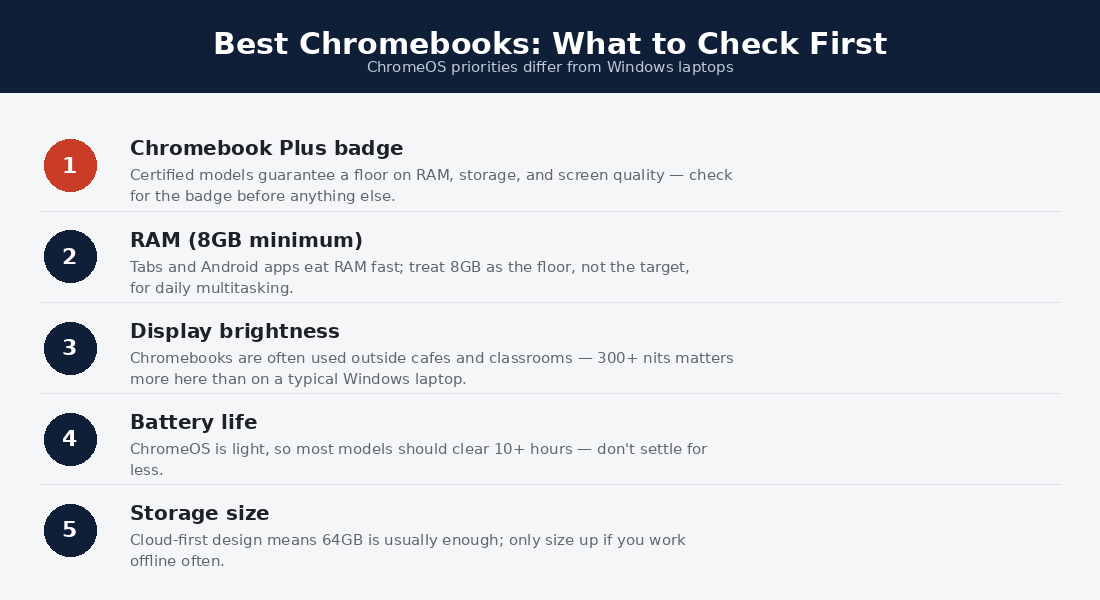
Google’s Chromebook Plus program quietly fixed the category’s worst problem: the sub-$250 shelf of dim-screened, 4GB machines that soured a generation of buyers. Plus certification mandates real minimums — current mid-tier silicon, 8GB of RAM, 128GB storage, a 1080p IPS screen, and a 1080p webcam — and the best Chromebooks all live inside it. The buying rule this creates is refreshingly simple: treat Plus certification as the entry requirement, then shop screen brightness, build, and price among the certified. The uncertified tier survives only for kiosk duty and kids’ spill zones.
The certification also unlocked the software story: Plus machines carry the on-device AI features, video-call enhancements, and multi-year update guarantees that make ChromeOS feel current rather than merely adequate. Google’s automatic update expiration dates — published per model at Google’s official support pages — remain the one spec Windows shoppers never think to check and Chromebook shoppers must: a discounted model with three years of updates left is not a bargain, it is a countdown.
1. Lenovo Chromebook Plus 14 — Best Overall
Lenovo’s Plus-class 14-incher wins by matching the certification’s floor with sensible ceilings: a bright 1200p screen in the productive 16:10 ratio, a keyboard clearly descended from the ThinkPad family tree, 10-12 honest battery hours, and a chassis that takes backpacks seriously. Nothing about it dazzles; everything about it works — which is precisely the ChromeOS promise kept in hardware. At its routine sale prices it is the default answer to the best Chromebooks question for anyone whose life fits the platform.
2. ASUS Chromebook Plus / Spin — Best Premium
ASUS builds the category’s aspirational tier: aluminum lids, 400-nit panels that survive window seats, backlit keyboards, and configurations that push toward $600 while staying comfortably under premium-Windows money. The Spin convertibles add the 360 hinge where ChromeOS earns it — Android apps, reading, and touch-first content genuinely suit tablet mode. This is the tier for buyers who chose ChromeOS deliberately rather than defensively and want hardware that honors the choice.
3. Acer Chromebook Plus 515 — Best Budget
The 515 demonstrates the certification’s floor: a full-sized 15-inch 1080p screen, 8GB, quiet reliability, and battery past the school day, at prices that regularly dip near the old junk tier’s territory. The build is plastic and the speakers are polite fictions, but nothing about daily use feels cheap — the exact inversion of the pre-Plus era, when everything felt cheap regardless of price. For households, second machines, and budget students, it is the honest floor of the best Chromebooks.
Who ChromeOS Actually Serves
The platform question outranks every hardware question, so answer it first. ChromeOS serves you completely if your computing lives in the browser and its ecosystem: documents, mail, streaming, banking, web apps, video calls, and the Android app library for the gaps. That covers a genuinely large population — students outside specialized majors, households, grandparents, second-machine buyers, and anyone whose Windows machine spent years as a Chrome frame anyway. The best Chromebooks give that population faster boots, longer batteries, invisible updates, and near-immunity to the malware economy, at prices the equivalent Windows experience cannot touch.
The disqualifiers are equally crisp: any required desktop application — CAD, statistics packages, most proctoring clients, serious photo and video suites, Windows-only business tools — ends the conversation before price begins. Serious gaming lives elsewhere (cloud gaming works but depends on your bandwidth), and heavy local development, while possible through the built-in Linux container, is happier on the machines in our programming guide. Students should audit their major’s software list against our college guide before committing; the wrong-major Chromebook is semester-one regret at any price.
Chromebook Lives, Matched to Models
The K-12 household is the platform’s home turf: indestructible-enough hardware, no-maintenance software, school-ecosystem compatibility, and prices that survive backpack physics — the budget 515 or any sale-priced Plus model, one per kid. The browser-native student gets the college guide’s cheapest honest pick, with the software audit done first and the update runway checked twice. The grandparent and the gift buyer may be the best Chromebooks’ strongest constituency: verified boot and invisible updates mean the family tech-support burden approaches zero, which no Windows machine at any price promises.
The second-machine professional — main rig at the desk, something light for the couch and the trip — finds the premium ASUS tier ideal: real keyboard, great screen, days of standby, and nothing on it that matters if the airline loses it. The café and commuter worker whose stack is genuinely web-based gets startling value against the machines in our café guide — though the glare and battery bars there still apply, which is why the 400-nit premium models earn their step-up. The pattern across all five: the best Chromebooks are bought for a life, not a spec sheet, and the platform question does the heavy lifting.
The Friction Ledger: A Week on ChromeOS
What the spec sheets can’t convey is the texture of the week. Monday opens with an eight-second boot into exactly the tabs you left; no update dialogs, because Tuesday’s patch installed itself at 3 a.m. behind a reboot you never saw. Wednesday’s video call just works — the Plus-mandated 1080p camera and platform-level enhancement handled it. Thursday a suspicious email attachment gets opened out of curiosity and dies quietly in a sandbox. Friday the battery meter still reads double digits at dinner, because ChromeOS idles like a phone. None of these are features anyone shops for; together they are the product.
The same week shows the edges honestly: the one desktop application you forgot you needed (the audit exists for a reason), a printer that wanted a driver ChromeOS refuses to imagine, an offline stretch that worked only because the sync settings were configured in advance. The best Chromebooks minimize the edges without erasing them — which is why the buyer-fit sections above outrank every hardware ranking on this page, and why the category rewards the ten-minute software audit more richly than any comparison shopping.
Specs That Separate the Best Chromebooks
Within the Plus tier, four specs do the separating. Screen brightness first: 300 nits is livable, 400 travels — panel quality is where budget models still economize. RAM second: 8GB serves; the growing 16GB configurations future-proof heavy tab habits for the machine’s whole update window. Build and keyboard third, tested in person where possible — the aluminum tier costs $100 more and feels $300 better. Update runway always: buy nothing with fewer than six years remaining. Storage matters least — ChromeOS lives in the cloud by design — and processor tiers within the certification differ less in feel than any Windows equivalent, because the OS asks so little.
Buying, Owning, and Retiring a Chromebook Well
Purchase timing on the best Chromebooks follows school calendars: back-to-school and January sales cut the Plus tier by 20-30% with boring reliability, and the category’s thin resale market means used buying saves less than it does elsewhere — buy new, on sale, with maximum update runway. At checkout, resist the storage upsell (the cloud is the storage) and take RAM instead where offered. The one accessory with universal payback is a sleeve; the platform’s repair economics make prevention worth a semester of caution.
Ownership asks almost nothing — that being the product — but two habits pay: configure offline sync in week one, and glance at the update-expiration date annually so retirement is planned rather than discovered. Retirement itself is the category’s only sad chapter: an expired Chromebook stops receiving security patches while running perfectly, and the honest options are guest-browsing duty, a community Linux conversion for the technical, or certified recycling. Plan the purchase against the runway and the machine retires with its usefulness spent rather than stranded — the last discipline that separates satisfied Chromebook owners from the ones who wrote the category’s old reviews.
Can the best Chromebooks run Android apps and Linux?
Both, usefully: the Play Store covers the tablet-app gap (quality varies by app, so test your must-haves in the return window), and the built-in Linux container turns Plus-tier hardware into a credible light development machine. Neither rescues a wrong-platform purchase — they extend a right one, and the audit still rules.
Best Chromebooks FAQs
Can a Chromebook replace a Windows laptop?
For browser-and-Android lives, completely and often pleasantly; for anyone needing specific desktop software, not at all. The audit takes ten minutes — list your required applications and check each against web and Android versions — and settles the question better than any review can.
How long do Chromebooks last?
Hardware-wise, five-plus years for the Plus tier; support-wise, exactly until the model’s automatic update expiration date, which is the number to check before buying. Current models ship with roughly ten years of runway from platform launch — but discounted older models carry less.
Do the best Chromebooks work offline?
Far better than their reputation: documents, mail drafting, downloaded media, and many Android apps all function offline and sync on reconnection. The setup takes one deliberate session in settings; do it before the first flight rather than during.
Are Chromebooks safe for banking?
Among the safest consumer computers sold: verified boot, sandboxing, and automatic updates make ChromeOS a hostile environment for the malware economy. The usual phishing cautions still apply — the platform protects the machine, not your judgment.
Chromebook or cheap Windows laptop at the same price?
Under $500, the Chromebook wins on experience almost unconditionally — the Windows machine at that price cuts the screen, RAM, and storage that make computing pleasant. The Windows pick becomes right only when required software forces it; then buy refurbished business stock instead, per our budget guide.
ChromeOS in 2026: What Changed and What Didn’t
The platform’s recent arc validated the buyers who stuck with it. On-device AI features arrived across the Plus tier without subscription tolls: live transcription, call enhancement, writing assistance, and image editing that run locally and quickly on certification-grade silicon. The Android app layer matured from novelty toward genuine utility, and the Linux container quietly became good enough that the best Chromebooks moonlight as development machines for web-stack work. Meanwhile the update guarantee stretched to a decade on current platforms — the longest committed support window in consumer computing, and an underrated answer to the category’s old disposability critique.
What didn’t change is the boundary: ChromeOS still refuses to be Windows, and the desktop-application wall stands exactly where it always stood. Interestingly, the rest of the industry moved toward ChromeOS rather than the reverse — ARM Windows machines now chase the same instant-on, all-day, low-maintenance virtues at triple the price, which is quiet vindication of what the best Chromebooks were selling all along. The buyer’s job remains unchanged too: audit the software life first, respect the runway, and let the certification do the spec homework. Done in that order, the category delivers the least eventful ownership in computing — its highest compliment.
What about Chromebooks for travel and remote work?
Underrated: multi-day standby, instant wake, cellular options on some models, and loss economics that make border crossings calm — several virtues our nomad guide prices at a premium come standard here. The dependency to plan around is connectivity: offline sync configured in advance turns flights into work sessions, while an unconfigured machine over the ocean is an expensive tray table. Web-stack workers with disciplined clouds report the platform travels better than Windows at twice the price.
Do Chromebooks work with external monitors and printers?
Monitors, docks, and USB-C hubs work as plug-and-play as anything sold — the Plus tier drives dual 4K displays without drama, making desk duty entirely realistic. Printers split by age: anything network-modern prints natively, while the decade-old inkjet demanding vendor drivers is the one peripheral that still defeats the platform. Check the printer before the purchase if it matters; replace it for $60 if it doesn’t.
Which of the best Chromebooks suits kids and family sharing?
Any Plus-certified budget model plus ChromeOS’s built-in family tooling: supervised accounts, per-profile controls, and instant profile switching make one machine serve a household more gracefully than any rival platform. Spills and drops argue for the plastic-bodied tier without regret — the certification already guaranteed the screen and speed that make homework tolerable, and the price already forgave the accident that is certainly coming.
Do the best Chromebooks handle video calls all day?
The Plus tier was practically certified for it: mandated 1080p webcams, platform-level noise cancellation and framing, and thermal designs that hold hour-six of calls as quietly as hour one. Pair a headset for the microphone half — true of every laptop platform — and the remote-work call stack runs as reliably here as machines costing three times more, which is precisely the value case the certification was built to make.
Is a used Chromebook ever worth buying?
Only with the expiration math done first: subtract today from the model’s published update date, and pay only for the years remaining — which usually prices used units below what sellers imagine. A machine with seven-plus years left at a genuine discount is a fine family or backup purchase; anything under five belongs in the guest-browsing tier at guest-browsing prices. The new-on-sale Plus models undercut most of the used market’s ambitions anyway, which is why this guide keeps steering there.
Verdict: The Ultimate Low-Friction Machines
The best Chromebooks of 2026 are the Plus-certified tier wearing three price points: the Lenovo Plus 14 as the balanced default, the ASUS premium models for buyers who want the platform’s ceiling, and the Acer 515 as the honest floor. Confirm ChromeOS fits your software life, confirm the update runway, insist on Plus certification, and the result is the least demanding computer ownership experience currently sold — machines that boot, work, and update without ever making themselves the day’s subject.
